The One-Character Bug That Made Our PHP Excel Library 30% Faster
Six days, seven releases, one external review. From v1.0.2 to v2.2.2 of kolay/xlsx-stream — what changed, why, and the lessons I didn’t expect.
A few months ago, I shared how we built kolay/xlsx-stream — a PHP package that exports millions of rows to Excel with constant memory and direct S3 streaming. The post ended at v1.0.2. Production was happy. A few dozen stars came in. I moved on to other things.
Then last week, someone walked through the codebase line by line and started asking uncomfortable questions.
Six days and seven releases later, the package:
- Produces actually correct Excel cells for DateTime, booleans, and 20-digit IDs (v1 silently corrupted all three).
- Has a real styling API — bold headers, column number formats, freeze panes, multi-sheet workbooks.
- Stops emitting XML that strict parsers refuse to open.
- Runs 30% faster than v2.2.0 and 15% faster than the v1.x baseline.
Same O(1) memory. Same direct-to-S3 streaming. Better at every layer above that.
Here’s what each release was actually for, and what I took away from doing them all in one week.
The Trigger: An External Review
The package worked. We exported 4.5 million rows to S3 in 96 seconds with 178 MB peak memory. The README was honest. The benchmark was reproducible.
But “works in production” is a famously low bar. When someone with no investment in the code went through it function by function, several things stood out fast:
- writeRow([new DateTime()]) threw a fatal error. The README said "supports DateTime."
- A 20-digit numeric string like "12345678901234567890" was silently cast to scientific notation, losing precision. IBANs, card numbers, and big database IDs were quietly mangled.
- Calling finishFile() twice didn't throw a controlled exception — it crashed with TypeError: hash_update(): Argument #1 must be a non-finalized HashContext.
- Boolean true became the string "1" and false became an empty cell. Whatever your XLSX consumer was, it wasn't reading native booleans.
Every one of those is a data-correctness bug, not a performance issue. Performance was the thing the package advertised. Correctness was the thing it had to be right about, and it wasn’t.
That review kicked off six days of work that turned into seven releases. Each one had a specific job.
v2.0.0: Data Correctness Was the Real Bug
The first release was the longest changelog. Every fix here was something you couldn’t undo without the user changing how they called the library — hence a major version bump.
DateTimeInterface actually produces a date cell
$writer->writeRow([new DateTime('2026-01-15 10:30:00')]);
In v1, this threw. In v2, it produces a real Excel date cell — a serial number with the right format applied:
<c r="A2" s="1" t="n"><v>46037.4375</v></c>
The Excel epoch is 1899-12-30 (yes, because Excel pretends 1900 was a leap year). Once that's accounted for, every Unix timestamp maps cleanly to a serial date.
Numeric strings keep their precision
$writer->writeRow(['12345678901234567890', '+905551234567', '00123']);
Value v1.x v2.0 '12345678901234567890' 1.23E+19 preserved as text '+905551234567' 905551234567 (sign dropped) preserved '00123' 123 preserved
The detection logic catches three cases: leading zeros (codes), + prefix (phone numbers), and integer strings longer than 15 digits (PHP's float precision limit). Everything else still becomes a numeric cell — "42" is still 42, "3.14" is still 3.14.
Booleans become native boolean cells
<c r="A2" t="b"><v>1</v></c>  <!-- true -->
<c r="A2" t="b"><v>0</v></c>  <!-- false -->
That’s what the OOXML spec says a boolean cell looks like. Any reader that handles XLSX correctly now reads these as booleans.
State machine guards
Calling writeRow() before startFile(), calling startFile() twice, or calling finishFile() twice now throws a controlled XlsxStreamException with a useful message instead of either silently producing broken output or crashing with a TypeError.
The full v2.0 changelog also bumped the dependency floor — PHP 8.0 went EOL in November 2023, Laravel 9 in February 2024. Those are gone. PHP 8.1+ and Laravel 10+ now.
v1.x users staying on v1.x is a valid choice if you can’t upgrade PHP. v2.0 is honest about what it breaks, and UPGRADE.md lists every behavior change with a one-line migration step.
v2.1.0: Making Laravel Feel Native
v2.0 fixed correctness. v2.1 made the package nice to use.
forDisk() reads from config/filesystems.php
In v1, exporting to S3 meant manually constructing an S3Client with credentials, region, and endpoint:
// v1: every project rewrites this boilerplate
$s3 = new S3Client([
    'version' => 'latest',
    'region' => env('AWS_DEFAULT_REGION'),
    'credentials' => [
        'key' => env('AWS_ACCESS_KEY_ID'),
        'secret' => env('AWS_SECRET_ACCESS_KEY'),
    ],
]);
$sink = new S3MultipartSink($s3, env('AWS_BUCKET'), 'reports/q4.xlsx');
$writer = new SinkableXlsxWriter($sink);
In v2.1, the package reads everything from config('filesystems.disks.s3') — the same place every other Laravel package does:
// v2.1: one line
$writer = SinkableXlsxWriter::forDisk('s3', 'reports/q4.xlsx');
It works for local disks too. If you're testing locally and don't want to mock S3, point it at a local disk and the same code path writes to a file.
writeRows() accepts any iterable
The hot path for huge exports is “fetch from database, write to XLSX, never materialize the result set in memory.” Eloquent’s lazy() cursor is exactly that — and writeRows() now consumes it directly:
$writer = SinkableXlsxWriter::forDisk('s3', 'users-export.xlsx');
$writer->startFile(['ID', 'Name', 'Email', 'Created']);

$writer->writeRows(
    User::query()
        ->select(['id', 'name', 'email', 'created_at'])
        ->orderBy('id')
        ->lazy(1000)
        ->map(fn ($u) => [$u->id, $u->name, $u->email, $u->created_at])
);

$writer->finishFile();
Generators, Iterator, IteratorAggregate — all work. Memory stays at 1-2 MB regardless of how many rows go through.
onProgress() for queue jobs
Long exports want a progress UI. onProgress registers a callback that fires every N rows:
$writer->onProgress(function (int $rows, int $bytes) use ($jobId) {
    Cache::put("export:{$jobId}", ['rows' => $rows, 'bytes' => $bytes], 300);
})->setProgressInterval(10000);
When no callback is registered, the check is a single null comparison per row — zero overhead for the 99% of users who don't need it.
v2.2.0: Real Styling, Not Just Output
v2.1 made the package easier to call. v2.2 made the output look like something you’d actually send to a customer.
StyleRegistry: deduplicates everything
The internal change that made the rest possible. Fonts, fills, number formats, and cellXfs records are deduplicated by value. Register the same preset twice — get the same style ID back. No bloat in xl/styles.xml, no recomputation per cell.
Header styling
$writer->setHeaderStyle([
    'bold'  => true,
    'fill'  => '#4F81BD',
    'color' => '#FFFFFF',
    'size'  => 12,
]);
The first row gets bold white text on a dark blue fill. Standard “professional report” look. Settable per sheet — each newSheet() can have its own header style.
Column number formats
$writer
    ->setColumnFormat(2, 'currency_try')   // ₺99,999.00
    ->setColumnFormat(3, 'percent')        // 12.50%
    ->setColumnFormat(4, 'date')           // 2026-01-15
    ->setColumnFormat(5, '0.000');         // raw Excel format code
Built-in presets cover dates, times, integers, decimals, percentages, and four currencies (TRY, USD, EUR, GBP). Anything else — pass the raw Excel format code.
String cells in a formatted column stay as inline strings; the format only applies to numeric and DateTime values. So mixed-type columns still render correctly.
Freeze panes, auto-filter, manual multi-sheet
$writer
    ->freezeFirstRow()           // header stays visible
    ->enableAutoFilter()          // dropdown filters on header
    ->setAutoColumnWidth();       // size each column from header text + format
newSheet($name, $headers) rotates to a new named sheet — for actual multi-sheet workbooks, separate from the auto-split that kicks in at Excel's 1,048,576-row limit:
$writer->startFile(['ID', 'Name']);
$writer->writeRows($users->lazy());

$writer->newSheet('Orders', ['Order ID', 'Customer', 'Total']);
$writer->writeRows($orders->lazy());
The format-aware auto-width detail
The first version of setAutoColumnWidth() sized columns from the header length only. Then the test report came back: a column titled "Salary" formatted as currency_try rendered as #### because ₺50,000.00 is 10 characters wide and "Salary" is 6.
The fix: each format preset declares a minimum width. Currency = 14, datetime = 20, percent = 10, date = 12. The auto-width heuristic takes max(8, header_length + 2, format_minimum). Real values don't get clipped.
public function minWidthForFormat(?string $name): int {
    return match ($name) {
        'currency_try', 'currency_usd' => 14,
        'datetime', 'datetime_iso'      => 20,
        'date'                          => 12,
        'percent'                       => 10,
        // ...
        default                         => 0,
    };
}
Small thing. Solves a real “why does my export look broken in Excel” support question.
v2.2.1: The Polish Round
Every API gets feedback after release. v2.2.1 was the polish PR.
- Color hex validation. setHeaderStyle(['fill' => 'not-a-color']) used to silently produce a styles.xml that Excel rejected. It now throws at registration time with a useful message.
- Custom font name. The 'name' option in setHeaderStyle is now plumbed all the way through. Font names are XML-escaped on the way out — so 'My "Font" & Co.' produces well-formed XML.
- Empty workbook is now a hard error. Calling finishFile() after startFile() with no rows and no newSheet() previously produced <sheets/>, which Excel and most readers refuse to open. It now throws XlsxStreamException::emptyWorkbook() with the actual fix in the message.
- Out-of-range column format. setColumnFormat(99, 'date') on a 3-column sheet used to silently register a format that never applied. Validation is now deferred to startNewSheet(), which lets you legitimately pre-configure formats for an upcoming newSheet() whose column count is different.
- Auto-width minimum for integer and decimal raised to 14 chars — same root cause as the v2.2.0 currency-width fix. A 10-digit integer formatted as #,##0 renders as 1,234,567,890 (13 chars). The previous minimum was below the threshold, so Excel clipped to ####.
Eighteen new tests in V221PolishTest. No performance impact.
v2.2.2: One Character, +30% Throughput
The release I didn’t see coming.
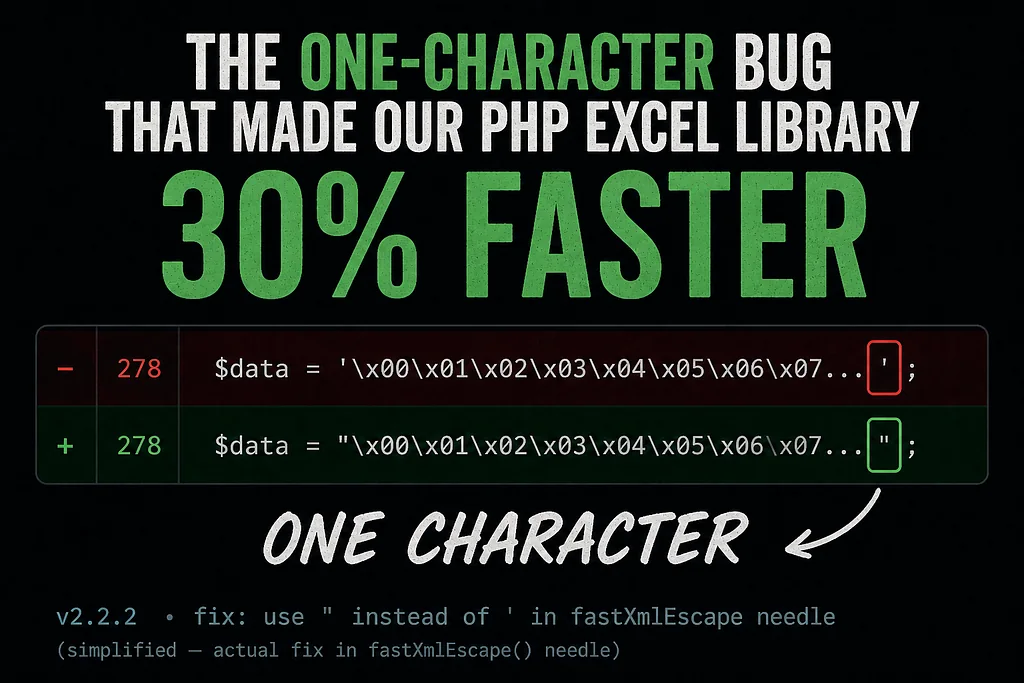
The same external review noticed that fastXmlEscape() — the per-cell sanitization function — had a subtle bug. The fast-path strpbrk call looked like this:
if (strpbrk($str, '&<>"\'\x00\x01\x02...\x1F') === false) {
    return $str;  // no escaping needed
}
In PHP, single-quoted strings don’t interpret \x escapes. That needle wasn't & < > " ' (null) (SOH) ... — it was the literal characters & < > " ' \ x 0 1 2 3 4 5 6 7 8 9 A B C D E F.
Real null bytes in the input never matched. The fast path returned the string unchanged. Control bytes leaked through to the output XML.
ZipArchive::CHECKCONS didn't catch it because the ZIP container itself was fine. But Excel uses a strict XML parser, and XML 1.0 forbids those bytes. The error you got was:
Excel: "Char 0x0 out of allowed range"
The file format or extension is not valid.
The fix was a single character:
- if (strpbrk($str, '&<>"\'\x00\x01\x02...\x1F') === false) {
+ if (strpbrk($str, "&<>\"'\x00\x01\x02...\x1F") === false) {
Single quote → double quote. Now PHP interprets the escapes as actual control bytes. The check works as intended. Excel opens the workbook.
The unexpected performance win
The buggy needle was 129 characters long (each \xNN taking 4 character positions instead of 1). The corrected needle is 36 characters — five XML special chars plus 31 actual control bytes.
strpbrk is implemented as a linear scan through the needle for each character of the input. 3.5× shorter needle = 3.5× cheaper check, run on every cell of every row.
Same machine, same workload, same compression level:
Workload v2.2.0 v2.2.2 Delta 1M rows local 161K rows/s 210K rows/s +30% 4.5M rows S3 107K rows/s 130K rows/s +22% Memory 0–2 MB 0–2 MB unchanged
It also beat the September 2025 v1.x baseline (183K rows/s on 1M local) by 15%. The “v2.x type detection costs 5–10% locally” caveat from v2.2.0 is no longer true.
A single-character fix made the package faster than the version that didn’t have any of the data-correctness checks.
Six new tests
tests/XmlSanitizationTest.php covers:
- Pure-lowercase string with embedded null byte
- Full C0 control set across two rows
- Mixed-case strings with control bytes
- Control bytes in headers (separate code path)
- Preservation of \t \n \r (valid XML chars)
- Slow-path &<>"' escape sanity
Every assertion runs the output through simplexml_load_string with libxml_use_internal_errors(true) — a strict parse that mirrors Excel's tolerance.
The Numbers, End to End
Same machine (Apple Silicon), same workload (8 columns, mixed types, compression level 1), same xlsx-test-package bucket in us-east-2:
Rows v1.x (Sept ’25) v2.2.2 (May ’26) Delta 100K local 33K rows/s 175K rows/s +430% 1M local 183K rows/s 210K rows/s +15% 1M S3 43K rows/s 95K rows/s +121% 4.5M S3 46K rows/s 130K rows/s +183% Memory (any size) O(1) O(1) unchanged
The S3 deltas are partly the AWS SDK upgrade and a faster network on the new test machine — the multipart upload code path is structurally the same. The local deltas are real algorithmic wins.
What I Took Away
Data correctness is non-negotiable, and it’s not a “polish” item. Every v2.0 fix was something v1 silently mishandled in production for months. People weren’t reporting bugs because the bugs were silent — Excel renders 1.23E+19 for a 20-digit ID, and the user just sees a weird number, not a corruption. If you're advertising "supports DateTime," your package needs to actually support DateTime, not throw a fatal error and call it a feature gap.
External review beats months of solo iteration. I had been working on this package for six months and missed every one of the issues the review found in an afternoon. The bugs weren’t subtle — they were just invisible from the inside. If you’re shipping a library that other people will run in production, find someone with no investment in your code and let them ask the dumb questions.
Single-character fixes are real. The v2.2.2 fix is the kind of thing you read about in postmortems for systems much larger than mine. A subtle interaction between PHP’s quote semantics and strpbrk's API turned a fast-path optimization into a silent correctness bypass that was also slower than the slow path. The fix landed +30% throughput as a side effect. Most performance work isn't this dramatic, but the principle holds: most of the cost is in code that shouldn't be doing what it's doing.
Polish is not optional, but it’s also not a separate phase. v2.2.1 had eighteen new tests, four bug fixes, and zero performance regressions — all from one PR. None of those changes were big. All of them came from “what could a user reasonably expect that the current code doesn’t do?” That question never stops paying off.
Your changelog is part of your API. Every release in this series has a CHANGELOG entry that says what changed, why, and what users have to do about it. The v2.0 release has an UPGRADE.md with a one-line migration for every behavior change. The v2.2.2 entry calls out the bug as pre-existing from v1.x and credits the external review. None of this is technically required. All of it is what makes a library someone wants to keep using.
Try It
composer require kolay/xlsx-stream:^2.2
The smallest useful program is still about as small as the v1 example:
use Kolay\XlsxStream\Writers\SinkableXlsxWriter;

$writer = SinkableXlsxWriter::forDisk('s3', 'reports/users.xlsx');
$writer
    ->setHeaderStyle(['bold' => true, 'fill' => '#4F81BD', 'color' => '#FFFFFF'])
    ->setColumnFormat(4, 'datetime')
    ->freezeFirstRow()
    ->enableAutoFilter();

$writer->startFile(['ID', 'Name', 'Email', 'Created']);
$writer->writeRows(User::query()->lazy(1000)->map(fn ($u) => [
    $u->id, $u->name, $u->email, $u->created_at,
]));
$writer->finishFile();
Four million rows, direct to S3, constant memory, real styling, formatted dates, frozen header, filter dropdowns. About two minutes on a laptop.
- GitHub: github.com/turgutahmet/kolay-xlsx-stream
- Packagist: kolay/xlsx-stream
- Roadmap: v2.3 will tackle parallel S3 multipart upload (RTT-bound today) and ZIP64 for files over 4 GB. The full plan is in ROADMAP.md.
If you find the next bug, open an issue. The last six days suggest the response time is reasonable.
Ahmet Turgut is a senior backend developer working on streaming data systems and the kolay/xlsx-stream package. Find more posts at @turgutahmet on Medium.