How We Built a PHP Package That Streams 4.5 Million Rows to Excel Without Breaking a Sweat
How We Built a PHP Package That Streams 4.5 Million Rows to Excel Without Breaking a Sweat (AWS, S3, Laravel )

How We Built a PHP Package That Streams 4.5 Million Rows to Excel Without Breaking a Sweat
The Problem That Started It All
Picture this: You’re building an enterprise system. The user wants a “simple” Excel export of all employee informations. Sounds easy, right? Until you realize it’s 4.5 million rows of data.
Try that with PHPSpreadsheet and watch your server catch fire. 🔥
Memory exhausted at 8GB. Server timeout. Angry users. Sound familiar?
The Journey: From Frustration to Innovation
Like many developers, I started with the popular solutions:
// The naive approach that crashes
$spreadsheet = new Spreadsheet();
$sheet = $spreadsheet->getActiveSheet();
foreach ($millionsOfRows as $row) {
    $sheet->fromArray($row); // RIP Memory 💀
}
After watching my server die for the 10th time, I knew there had to be a better way. That’s when I decided to build kolay/xlsx-stream — a package that can handle millions of rows with just 40MB of memory.
The Secret Sauce: Understanding XLSX Files
Here’s what most developers don’t know: XLSX files are just ZIP archives containing XML files. Once you understand this, the solution becomes clear.
excel.xlsx (it's actually a ZIP!)
├── [Content_Types].xml
├── _rels/
├── xl/
│   ├── styles.xml
│   ├── workbook.xml
│   └── worksheets/
│       └── sheet1.xml
Instead of building a massive DOM tree in memory, why not generate these files directly as a binary stream?
The Architecture: Zero Disk I/O
Here’s how we architected the solution:
// The magic happens at the binary level
class BaseXlsxWriter {
    protected function writeZipHeader($filename) {
        // Generate ZIP local file header (30 bytes)
        $header = "\x50\x4b\x03\x04";  // ZIP signature
        $header .= "\x14\x00";          // Version needed
        $header .= "\x08\x00";          // Compression method (deflate)
        // ... more binary magic

        $this->writeToDest($header);
    }

    protected function compressData($xmlContent) {
        // Stream compression - never store uncompressed data
        $this->deflateContext = deflate_init(ZLIB_ENCODING_RAW);
        $compressed = deflate_add($this->deflateContext, $xmlContent, ZLIB_NO_FLUSH);
        return $compressed;
    }
}
The Game Changer: Direct S3 Streaming
This is where things get interesting. Instead of:
- Create file locally
- Upload to S3
- Delete local file
We do:
- Stream directly to S3 using multipart upload
class S3MultipartSink implements Sink {
    private string $buffer = '';
    private int $partSize = 33554432; // 32MB parts
    private array $parts = [];

    public function write(string $data): void {
        $this->buffer .= $data;

        // When buffer reaches 32MB, upload as a part
        while (strlen($this->buffer) >= $this->partSize) {
            $chunk = substr($this->buffer, 0, $this->partSize);
            $this->uploadPart($chunk);
            $this->buffer = substr($this->buffer, $this->partSize);
        }
    }

    private function uploadPart(string $chunk): void {
        $result = $this->s3Client->uploadPart([
            'Bucket' => $this->bucket,
            'Key' => $this->key,
            'UploadId' => $this->uploadId,
            'PartNumber' => $this->partNumber++,
            'Body' => $chunk
        ]);

        $this->parts[] = [
            'ETag' => $result['ETag'],
            'PartNumber' => $this->partNumber - 1
        ];
    }
}    public function write(string $data): void {
        $this->buffer .= $data;
Real-World Usage
Here’s how simple it is to use:
use Kolay\XlsxStream\Writers\SinkableXlsxWriter;
use Kolay\XlsxStream\Sinks\S3MultipartSink;
use Aws\S3\S3Client;

// Setup S3 client
$s3Client = new S3Client([...]);

// Create S3 sink with 32MB parts
$sink = new S3MultipartSink(
    $s3Client,
    'my-bucket',
    'exports/huge-file.xlsx'
);

// Create writer
$writer = new SinkableXlsxWriter($sink);
$writer->startFile(['ID', 'Name', 'Email', 'Department']);

// Stream millions of rows from database
User::query()
    ->orderBy('id')
    ->chunkById(1000, function ($users) use ($writer) {
        foreach ($users as $user) {
            $writer->writeRow([
                $user->id,
                $user->name,
                $user->email,
                $user->department
            ]);
        }
    });

$stats = $writer->finishFile();
echo "Exported {$stats['rows']} rows directly to S3!";
The Memory Magic: Understanding the Sawtooth Pattern
When monitoring memory usage during S3 streaming, you’ll see this pattern:
Memory (MB)
    ↑
80  │      ╱╲      ╱╲      ╱╲
    │     ╱  ╲    ╱  ╲    ╱  ╲
40  │    ╱    ╲  ╱    ╲  ╱    ╲
    │   ╱      ╲╱      ╲╱      ╲
0   └─────────────────────────────→ Time
        ↑Upload  ↑Upload  ↑Upload
This is by design! Each peak represents a full 32MB buffer ready for upload. After upload, memory drops as the buffer clears. This is optimal for streaming.
Benchmark Results: The Proof
We tested with datasets from 100 rows to 4.5 million rows:
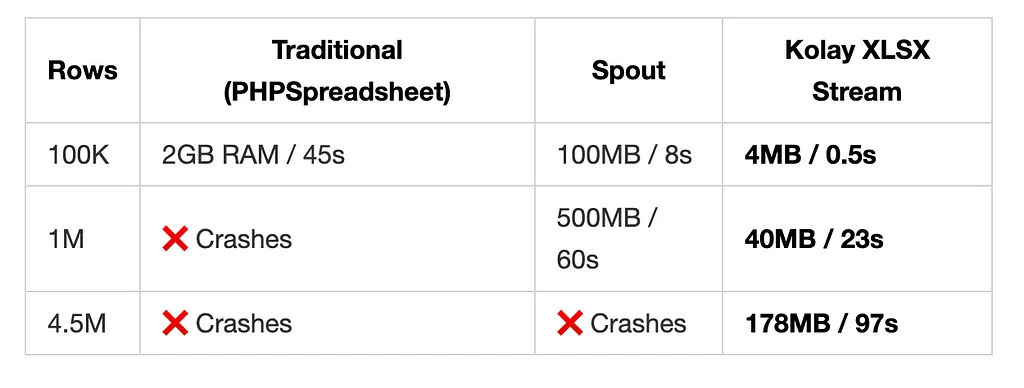
Production Test: 4.5 Million Rows
- Dataset: Employee information
- File Size: 178MB compressed XLSX
- Time: 97 seconds
- Memory: 178MB average (with controlled fluctuation)
- Result: ✅ Success, user happy!
The Technical Deep Dive
1. Binary ZIP Generation
Instead of using PHP’s ZipArchive (which requires disk access), we generate ZIP headers manually:
protected function writeLocalFileHeader($filename): void {
    $header = pack('V', 0x04034b50);  // Local file header signature
    $header .= pack('v', 20);          // Version needed to extract
    $header .= pack('v', 0x0808);      // General purpose bit flag
    $header .= pack('v', 8);           // Compression method (deflate)
    // ... timestamps, CRC32, sizes
    $this->writeToDest($header . $filename);
}
2. Streaming Compression
We use PHP’s incremental deflate functions:
$this->deflateContext = deflate_init(ZLIB_ENCODING_RAW, [
    'level' => $this->compressionLevel
]);

// Compress data in chunks
$compressed = deflate_add($this->deflateContext, $xmlData, ZLIB_NO_FLUSH);
$this->writeToDest($compressed);

// Finish compression
$final = deflate_add($this->deflateContext, '', ZLIB_FINISH);
$this->writeToDest($final);
3. Smart Row Buffering
We don’t write each row immediately. Instead, we buffer them:
protected function writeRow(array $row): void {
    $this->rowBuffer .= $this->buildRowXml($row);
    $this->rowBufferCount++;

    // Flush every 10,000 rows
    if ($this->rowBufferCount >= 10000) {
        $this->flushRowBuffer();
    }
}
4. Automatic Sheet Splitting
Excel has a limit of 1,048,576 rows per sheet. We handle this automatically:
if ($this->currentSheetRow >= self::ROWS_PER_SHEET) {
    $this->finishCurrentSheet();
    $this->startNewSheet();
}
Why This Matters
In the age of big data, being able to export large datasets efficiently is crucial. Whether you’re building:
- Enterprise reporting systems
- Data analytics platforms
- E-commerce order exports
- Financial reports
You need a solution that won’t bring your server to its knees.
The Open Source Journey
We’ve open-sourced this package because we believe in giving back to the community. After struggling with this problem ourselves, we don’t want others to go through the same pain.
Install it via Composer:
composer require kolay/xlsx-stream
GitHub: github.com/turgutahmet/kolay-xlsx-stream
Lessons Learned
- Understanding file formats at the binary level opens new possibilities
- Don’t just use libraries, understand what they do
- Sometimes the “hard way” is actually easier
2. Streaming is powerful but requires different thinking
- You can’t go back and edit previous data
- Plan your data structure upfront
3. Memory efficiency isn’t just about using less memory
- It’s about predictable, constant memory usage
- O(1) vs O(n) makes all the difference at scale
4. S3 multipart upload is a game-changer
- Direct streaming eliminates intermediate storage
- 32MB chunks are optimal for most use cases
What’s Next?
We’re working on:
- Style support (pre-defined styles for headers, currency, dates)
- CSV streaming with the same architecture
- Google Sheets API streaming
- WebSocket streaming for real-time progress
Conclusion
Building kolay/xlsx-stream taught us that sometimes the best solution isn’t to optimize existing approaches, but to fundamentally rethink the problem.
By understanding XLSX files at the binary level and leveraging S3’s multipart upload, we’ve created a solution that makes previously impossible exports trivial.
The next time someone asks you to export “just a few million rows to Excel,” you can smile and say “no problem!” 😎
About the Author: I’m a software engineer passionate about performance optimization and elegant solutions to complex problems. This package was born from real-world pain in production systems handling millions of records daily.
Try it out: composer require kolay/xlsx-stream
Star on GitHub: github.com/turgutahmet/kolay-xlsx-stream
Have you dealt with large Excel exports? What solutions have you tried? Let me know in the comments!