What is an LLM? Building Models and Datasets with Fine-Tuning Using Hugging Face and Unsloth
1. Introduction
1.1 What is an LLM (Large Language Model)?
Hello! In this article, we will take a closer look at "Large Language Models" (LLMs), which we frequently hear about in the field of artificial intelligence and natural language processing (NLP) these days. In short, LLMs are models trained on extremely large datasets and can generate text that closely resembles human speech or written language. The introduction of the Transformer architecture in 2017 was groundbreaking, paving the way for models like GPT, BERT, and LLaMA to rise in popularity.
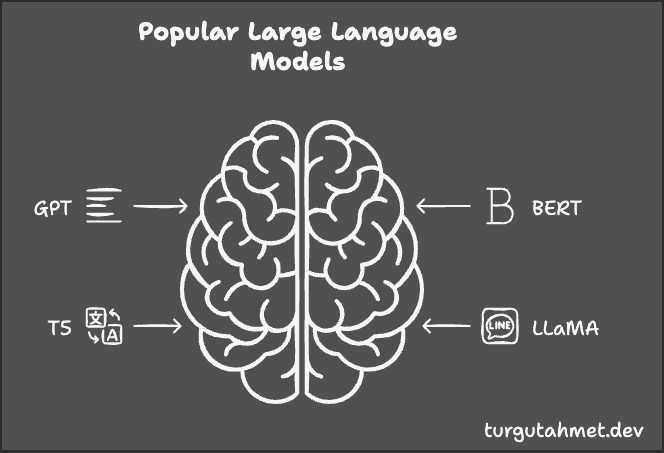
| Model | Architecture | Usage | Key Feature |
|---|---|---|---|
| GPT | Decoder-only | Text generation, completion | Large-scale text generation |
| BERT | Encoder-only | Text understanding, classification | Bidirectional context analysis |
| T5 | Encoder-Decoder | Translation, summarization | Text-to-text format for all tasks |
| LLaMA | Decoder-only | General-purpose NLP tasks | Open source, low resource consumption |
Today, LLMs are being used in a wide range of fields, from medicine to law, from education to customer service. For example, they can help doctors summarize medical documents, analyze legal texts, or make chatbot interactions more natural and fluent.
1.2 How Are LLMs Trained?
You might be wondering, "So how are these huge models trained?" Actually, the process involves a standard but laborious journey that starts with data collection and goes on to setting up the model architecture, training loops, and evaluation steps. Let's go through it step by step.
1.2.1 Data Collection & Preprocessing
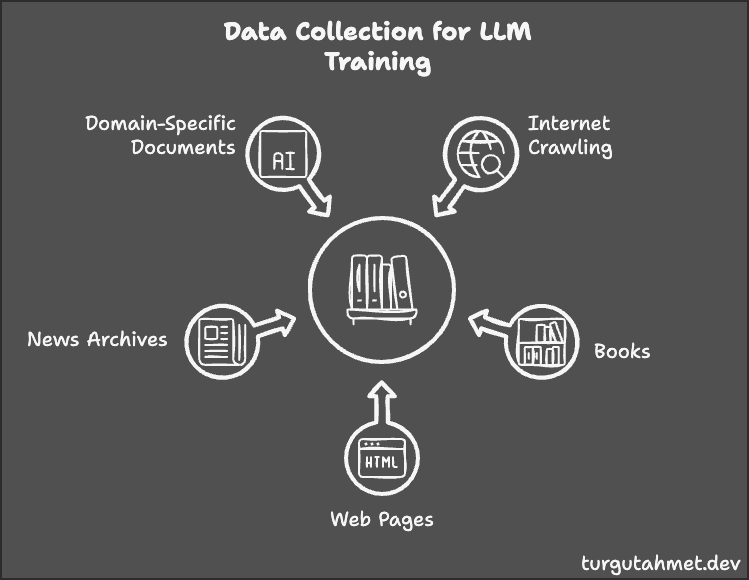
First, you need to collect a lot of text for the model to learn from. Massive sources on the internet (Wikipedia, blogs, news sites, etc.) and domain-specific documents (medical, legal, etc.) form the foundation of this process. However, cleaning and preparing this collected data for the model is just as important as the collection itself.
Steps:
Raw Data Collection:
- Data is obtained from various sources (Wikipedia, books, web pages, news archives).
- The more diversity you have, the better the model can learn general language knowledge and context understanding.
Preprocessing:
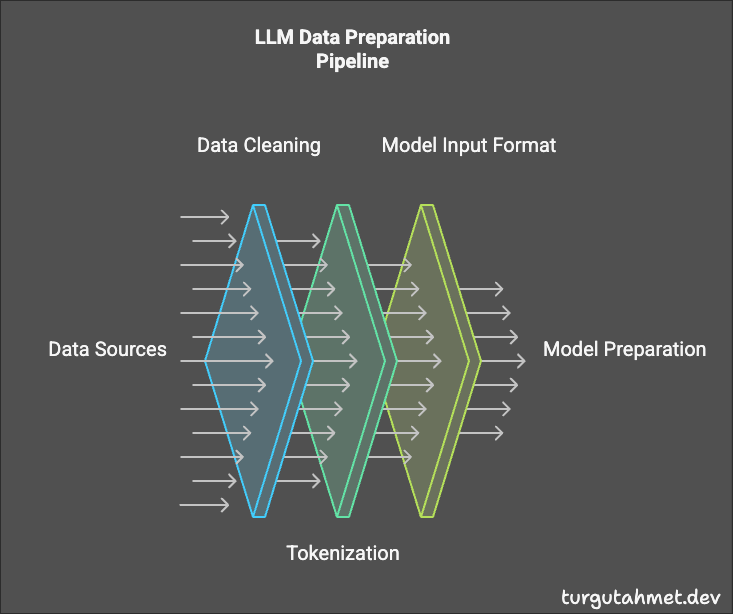
- Various operations such as fixing punctuation and removing unnecessary symbols are performed to simplify the text.
- With tokenization (e.g., BPE), text is broken down into words or subwords, making it more understandable to the model.
- Finally, the data is converted into model-readable formats (token IDs, attention masks).
1.2.2 Model Architecture and Hyperparameters
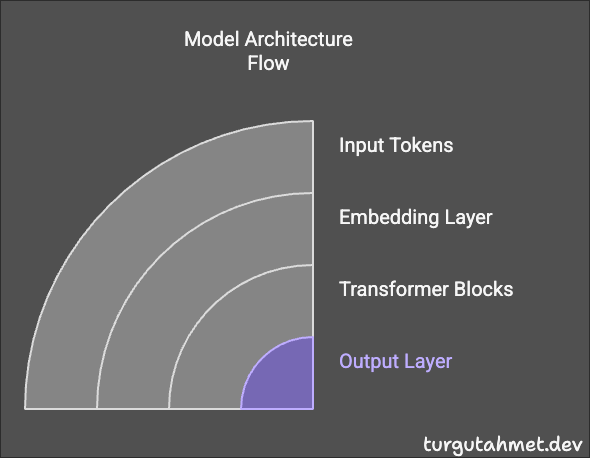
The data has been collected and cleaned, and it's ready. Next, it's time to select a Transformer-based architecture (Encoder, Decoder, or both) and define the hyperparameters (such as learning rate, batch size). These settings are critical because they directly affect performance.
Transformer Architecture:
- Encoder (BERT style): Excels at text comprehension tasks (classification, sentiment analysis).
- Decoder (GPT style): Effective for generating or extending text.
- Encoder-Decoder (T5 style): Can both understand the input and generate output. Ideal for tasks like translation and summarization.
Hyperparameters:
- Learning Rate: Controls how fast the model learns.
- Batch Size: Specifies how many data samples are processed at each step.
- Number of Layers: Indicates the depth of the model.
- Number of Heads: Parallel channels in the attention mechanism.
- Hidden Size: The number of neurons in each layer.
- Dropout Ratio: The rate at which connections are randomly dropped between layers to reduce overfitting.
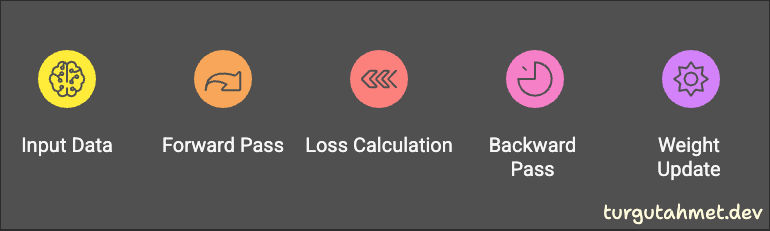
1.2.3 Training Loop
We've built the model and prepared the data. Now we're at the training stage, where everything comes together. The model goes through the dataset multiple times, updating its parameters to reach the best performance.
Steps:
Forward Pass:
- The input data is fed into the model and passed through the layers to produce a predicted output.
- For GPT, for example, it predicts the next word.
Loss Calculation:
- The difference between the model's prediction and the actual target is measured (e.g., Cross Entropy Loss).
Backward Pass:
- Weights are updated via gradient calculations to minimize the calculated loss.
Optimization:
- Algorithms like Adam or AdamW dynamically adjust the learning rate to improve the training process.
This loop can repeat hundreds of thousands, even millions of times. Essentially, training an LLM is like running a marathon.
1.2.4 Evaluation & Monitoring
While training is ongoing, regular performance measurements are made to see if the model is actually learning. Typically, a separate validation set is used, and if the model's performance starts to worsen on this set, methods like early stopping can be used.
Steps:
Validation Set:
- The model is periodically tested with data it has never seen.
- The aim is to achieve a good overall performance without suffering from overfitting.
Early Stopping:
- Training is halted when validation error starts to rise, preventing unnecessary time and resource consumption.

1.2.5 Post-Training
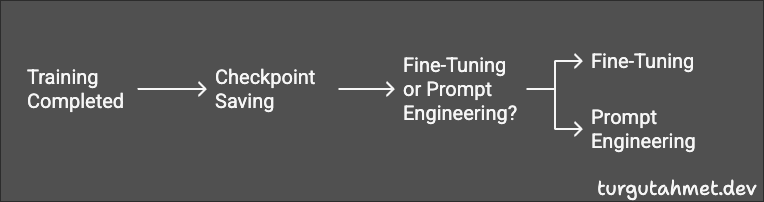
Let's say we've successfully completed the training. The next step is to adapt the model to different tasks or deploy it directly. At this point, we move on to steps like checkpoint saving and fine-tuning.
Steps:
Checkpoint Saving:
- Saving model weights at different stages of training makes it easier to revert to a desired version.
Model Adaptation:
- For instance, a very general language model can be re-trained (fine-tuned) on specific medical texts, or quickly adapted via prompt engineering.
1.3 Advantages and Disadvantages of LLM Training
Advantages:
- Wide Adaptability: They can easily adapt to many NLP tasks.
- High Accuracy: Human-like text generation and deep contextual analysis.
- Versatility: Can be used for chatbots, summarization, translation, and many other tasks.
Disadvantages:
- Resource Intensity: Training is GPU/TPU-intensive and time-consuming.
- Large Data Requirement: Collecting quality, clean data is a task in itself.
- Output Control: Large models risk making mistakes or producing fabricated information.
1.4 What is Fine-Tuning?
Although LLMs learn general language knowledge very well through gigantic datasets, they may need extra training to deeply understand certain domains like medical or legal terminology. This special training process is called "fine-tuning."
During fine-tuning, the model's fundamental abilities (linguistic knowledge, general world knowledge, etc.) remain intact, while it learns the specific details of the domain or task in question. The need for data and cost is much lower compared to training from scratch.
Nowadays, methods like LoRA (Low-Rank Adaptation) and PEFT (Parameter-Efficient Fine-Tuning) have become widespread. Instead of training all parameters of the model, you can train only a few added layers, which reduces resource usage and speeds up training.
At this point, platforms like Hugging Face allow quick access to pretrained models, while projects like Unsloth optimize the fine-tuning process, especially for large models (LLaMA, Mistral, etc.). We'll see examples of how to use these tools in the following sections.
1.5 The Role of Hugging Face and Unsloth
Hugging Face is an ecosystem that we frequently encounter in the NLP world, offering thousands of models and datasets to its users. Thanks to the Transformers library, using popular models like GPT, BERT, and T5 becomes extremely easy. Additionally, the Hugging Face Hub provides a community-focused platform where everyone can share their models and datasets.


The Role of Hugging Face in Fine-Tuning:
- Access to Pretrained Models: Download any pretrained model in seconds.
- Dataset Options: The Hugging Face Hub also hosts a wide variety of datasets.
- Training and Evaluation Tools: It offers ready-to-use functions to train and evaluate model performance.
The Role of Unsloth in Fine-Tuning:
Unsloth is a tool specifically designed to make the training of large language models more efficient. By supporting methods like LoRA and PEFT, it allows you to adapt the model by adding parameters instead of training the entire model.
Advantages of Unsloth:
- Memory Savings: LoRA and PEFT methods can reduce memory usage even for massive model sizes.
- Faster Training: Fewer parameters are updated, speeding up the process.
- Hugging Face Integration: Can be easily integrated into your existing Hugging Face workflow.
Example Usage Scenario:
- Download your desired LLM and dataset from Hugging Face Hub.
- Start fine-tuning with LoRA or PEFT methods using Unsloth.
- Perform training and evaluation with Hugging Face's Trainer API or similar tools.
- After completion, upload your model back to the Hugging Face Hub for distribution.
Conclusion:
Hugging Face and Unsloth are two critical components that simplify and optimize the fine-tuning process of large language models. Hugging Face makes selecting models and datasets effortless, while Unsloth gives you substantial advantages in terms of memory and speed. By using them together, you can develop highly successful, specialized NLP solutions.
2. Fundamentals of Fine-Tuning
2.1 How Does Fine-Tuning Work?
Fine-tuning is based on adapting the capabilities of a pretrained model to a new task. Thus, the language knowledge and pattern understanding already acquired by the model can be leveraged again for a different domain with a small tweak — a concept known as "transfer learning." This approach offers significant time and resource savings.
For example, consider BERT. Since BERT is trained on massive amounts of text, it understands grammar rules, vocabulary, and relationships within text very well. If you want to perform sentiment analysis, you can fine-tune its final layers or certain parameters. This allows the model to adapt to your new task in a relatively short time.
2.2 Types of Fine-Tuning
- Full Fine-Tuning: Retrains all the parameters of the model. If you have a lot of data and a project that's very specific, it can be a good option, but GPU memory and computational power requirements are higher.
- Partial Fine-Tuning: Usually retrains the final layers or certain parts of the model. Faster and requires fewer resources.
- LoRA (Low-Rank Adaptation) and PEFT (Parameter-Efficient Fine-Tuning): In these methods, most of the model's main body remains fixed. Only a small number of added parameters or additional layers are trained. This provides memory savings and speed benefits.
2.3 Requirements for Fine-Tuning
Hardware Requirements:
- At least one GPU or TPU (multiple GPUs for larger models)
- As model size grows, so does GPU memory usage
Software Requirements:
- Python
- PyTorch or TensorFlow (only one needed)
- The Hugging Face Transformers library
- The
datasetslibrary for data handling - Optionally, Unsloth or similar tools
3. Creating Datasets and Their Formats
3.1 Dataset Creation Process
"Quality data = successful model" might sound cliché, but it's often true. The dataset you use for fine-tuning determines the specialized topic the model will focus on. Hence, data collection, cleaning, and preprocessing steps are crucial.
- Data Collection: Choose data sources relevant to your domain (Wikipedia, proprietary corporate data, etc.).
- Data Cleaning: You'll need to remove duplicates, incorrect labels, unnecessary symbols, etc.
- Preprocessing: Tokenization, case normalization, or filtering out stop words if necessary.
3.2 Dataset Formats
For instruction-based teaching in particular (such as Alpaca Format), the data structure includes both input and output.
{
  "instruction": "Write a short poem about the night sky.",
  "input": "",
  "output": "Twinkling lights adorn the velvet night..."
}
In this template, the instruction field specifies what you want the model to do, input provides any additional context, and output holds the target response.
- JSON / CSV / TXT: Traditional formats still widely used.
- Hugging Face Dataset Format: An optimized Arrow format utilized by the
datasetslibrary.
4. Loading and Sharing Datasets with Hugging Face
4.1 Loading and Processing a Dataset
Working with the datasets library from Hugging Face is truly convenient. You can load CSV or JSON files in a single line or directly use a dataset shared on the Hub:
from datasets import load_dataset
dataset = load_dataset("ahmetturgut/testBio")
# You can put your own dataset name here.
4.2 Example Project: Creating a Dataset in Alpaca Format
Let's say you have a CSV file that you want to upload to the Hugging Face Hub and convert it into the Alpaca format. The code snippet below shows how you can do this in Colab:
# Installing necessary libraries
! pip install datasets
! pip install huggingface_hub

from huggingface_hub import login
from datasets import Dataset
import pandas as pd

# Log in to Hugging Face
login()

# Reading data from CSV
input_df = pd.read_csv("dataset.csv")

# Converting the DataFrame to a Dataset object and splitting it into train-test
dataset = Dataset.from_pandas(input_df)
dataset = dataset.train_test_split(test_size=0.1)

# Uploading the dataset to Hugging Face Hub
dataset.push_to_hub("ahmetturgut/testBio")
As you can see, you can easily upload and share your dataset on the Hub with just a few lines of code. After that, you can download this data and include it in your fine-tuning process or use it immediately in your model development work.
| Instruction | Input | Response |
|---|---|---|
| Explain the cleaning and disinfection procedure for BiO2Flow | How are cleaning and disinfection procedures performed? | Cleaning procedure: 1. Turn off device and disconnect power 2. Wear protective equipment 3. Remove detachable parts 4. Clean with appropriate disinfectant 5. Allow to dry Note: Flammable cleaning agents must not be used |
| Explain the humidifier chamber setup steps for BiO2Flow | How is the humidifier chamber prepared and installed? | Humidifier chamber setup steps: 1. Connect chamber with connection apparatus 2. Make sterile water connection 3. Press the locking mechanism 4. Attach chamber to device in correct orientation 5. Verify connection security |
| List the safety warnings for BiO2Flow device | What are the safety precautions for device use? | Important safety warnings: 1. Must only be operated by authorized medical personnel 2. Alternative respiratory source must be available 3. Must not be used in environments with flammable gases 4. Device must not be used during radiotherapy 5. Must only be plugged into grounded outlets 6. Only Biosys-approved accessories must be used |
| Explain the main features of the BiO2Flow high-flow oxygen therapy device | General information about BiO2Flow device is requested | BiO2Flow is a device used for treating spontaneously breathing patients who would benefit from high-flow, heated and humidified respiratory gases. Main features: - Flow rate up to 110 lpm - Precise FiO2 adjustment (21-100%) - Integrated humidifier and nebulizer - Integrated battery - One-touch operation |
| List the technical specifications of BiO2Flow | What are the device's technical specifications? | Technical Specifications: - Flow: 5-110 L/min (5 lpm resolution) - FiO2: 21-100% (1% resolution) - Temperature: 31-37°C - Pressure Sources: Air (Internal Blower), Oxygen (2.5-7 Bar) - Safety Class: Class II, Type BF - IP Protection: IP21 |
This example dataset, prepared in instruction-tuning format, contains the BiO2Flow device's operating instructions and technical specifications. It has been shared on the Hugging Face Hub in the ahmetturgut/testBio repository.
5. Fine-Tuning with Unsloth
In this section, we will explain step-by-step — in a way that's easy on the eyes — how you can fine-tune large language models (LLMs) using Unsloth. We will clarify what each code cell and configuration setting does, from start to finish. You will also learn how to reduce memory usage and speed up training using up-to-date techniques such as LoRA (Low-Rank Adaptation) and PEFT (Parameter-Efficient Fine-Tuning).
In a nutshell, Unsloth is a library that simplifies fine-tuning LLMs. Rather than re-training all the massive parameters from scratch, methods like LoRA and PEFT let you train only a few new layers or certain parameters. As a result, it's possible to achieve your desired outcome without requiring huge memory (RAM/GPU) resources or extremely long training times.
In the subheadings below, you'll find how to install Unsloth in a Google Colab environment, use a trained model, integrate LoRA adapters into your project, and how to save and reload your model. You can start from any section you like and come back to the earlier sections whenever you need.
5.1 Installing Unsloth
Our initial steps are quite simple. We can install Unsloth in a single pip command in an environment like Google Colab. Within just a couple of minutes, you'll be ready to fine-tune large language models.
5.2 Fine-Tuning by Adding LoRA Adapters
LoRA (Low-Rank Adaptation) is a technique that allows us to update only certain parameters of large models, instead of training all layers from end to end. It specifically targets projection layers like q_proj, k_proj, enabling significant savings in memory and time. Therefore, LoRA is ideal for those who say "My GPU memory is very limited" or "I want faster training."
5.3 Preparing the Data
Whether using Unsloth or other fine-tuning workflows, having a quality dataset is nearly everything. Here, we show how you can organize instruction-based (Alpaca) datasets. For instance, when combining "Instruction," "Input," and "Response," make sure you add the EOS_TOKEN (End of Sequence) so the model knows where to stop — otherwise, it could go on talking forever!
5.4 Training the Model
In the training step, we'll use the SFTTrainer (Supervised Fine-Tuning Trainer) class from the Hugging Face ecosystem. Here, we set fundamental parameters like the learning rate, batch size, and number of training steps. Don't be intimidated by the code block; we'll comment on each line. If you run into "out of memory" issues, consider adjusting gradient_accumulation_steps or batch_size to ease your system.
5.5 Saving and Using the Model
Once your training is complete, you'll want to preserve the final version of your model. Unsloth lets you save your model locally or upload it directly to the Hugging Face Hub. This means you can resume your project from where you left off at any time, share it with your team, or continue working on a different machine.
Next, we'll take a closer look at code snippets for all these steps. We'll also mention common errors you might encounter and highlight important tips.
5.6 Step-by-Step Code Explanation
You can see how to perform the fine-tuning process with Unsloth in a Google Colab environment by following the link below:
Google Colab Notebook
5.6.1 Introduction and Setup
In this first code cell, we set up our environment and quickly get started with Unsloth. If you're using Google Colab, you can run all cells at once from "Runtime > Run all." We've also included links for documentation and ways to get in touch if you have questions.
# To run this, press "Runtime" and press "Run all" on a free Tesla T4 Google Colab instance!
# Basic instructions to get started with Unsloth.
# Also includes a link to Discord, documentation, and so on.
5.6.2. Installing Unsloth
Here, we install the library with pip install unsloth. Then we use --force-reinstall and --no-cache-dir to ensure we get the latest versions. This helps avoid issues like "Why was the old version installed?" or "Why is my version not working?"
%%capture
!pip install unsloth
# Also get the latest nightly Unsloth!
!pip install --force-reinstall --no-cache-dir --no-deps git+https://github.com/unslothai/unsloth.git
5.6.3. Loading the Model and Tokenizer
We download the Meta-Llama-3.1-8B model from Hugging Face and load it via the FastLanguageModel.from_pretrained method. By using the load_in_4bit option, we enable 4-bit quantization, which greatly reduces both RAM and GPU memory usage. This allows training to happen even on lower-spec hardware.
from unsloth import FastLanguageModel
import torch
max_seq_length = 2048 # Feel free to pick a sequence length
dtype = None # Let Unsloth choose the best dtype automatically
load_in_4bit = True # 4bit quantization for memory efficiency

fourbit_models = [
    "unsloth/Meta-Llama-3.1-8B-bnb-4bit",
    "unsloth/Meta-Llama-3.1-70B-bnb-4bit",
    "unsloth/Mistral-Nemo-Base-2407-bnb-4bit",
    # ... see https://huggingface.co/unsloth for all available
]

model, tokenizer = FastLanguageModel.from_pretrained(
    model_name = "unsloth/Meta-Llama-3.1-8B",
    max_seq_length = max_seq_length,
    dtype = dtype,
    load_in_4bit = load_in_4bit,
    # token = "hf_..." # required for gated models
)
5.6.4. Adding LoRA Adapters
We call FastLanguageModel.get_peft_model to add LoRA adapters. Parameters like r=16 and lora_alpha=16 define the capacity of LoRA. You can specify which layers to train via the target_modules list. This way, you don't touch layers the model doesn't need updated.
model = FastLanguageModel.get_peft_model(
    model,
    r = 16,
    target_modules = ["q_proj", "k_proj", "v_proj", "o_proj",
                      "gate_proj", "up_proj", "down_proj"],
    lora_alpha = 16,
    lora_dropout = 0,
    bias = "none",
    use_gradient_checkpointing = "unsloth",
    random_state = 3407,
    use_rslora = False,
    loftq_config = None,
)
5.6.5. Data Preparation
Here's an example using the Alpaca dataset. Of course, you can customize your instruction format any way you like. The important point is for the model to clearly separate the question from the answer. Also remember to use an EOS_TOKEN to properly mark where the text ends.
alpaca_prompt = """Below is an instruction...
### Instruction:
{}

### Input:
{}

### Response:
{}"""

EOS_TOKEN = tokenizer.eos_token

def formatting_prompts_func(examples):
    instructions = examples["instruction"]
    inputs       = examples["input"]
    outputs      = examples["output"]
    ...
    # Return dictionary with "text" key so SFTTrainer can read
    return { "text" : texts }
5.6.6. Training Phase
When we move to training, we carefully choose arguments like train_dataset, per_device_train_batch_size, and gradient_accumulation_steps. These directly impact training performance and speed. If you encounter "out of memory" errors, try reducing batch_size or max_steps.
from trl import SFTTrainer
from transformers import TrainingArguments
from unsloth import is_bfloat16_supported

trainer = SFTTrainer(
    model = model,
    tokenizer = tokenizer,
    train_dataset = dataset,
    dataset_text_field = "text",
    args = TrainingArguments(
        per_device_train_batch_size = 2,
        gradient_accumulation_steps = 4,
        max_steps = 60,
        learning_rate = 2e-4,
        output_dir = "outputs",
        report_to = "none",  # set "wandb" if you want to track metrics with Weights & Biases
    ),
)

trainer_stats = trainer.train()
5.6.7. Inference Phase
After training, we switch the model to "inference mode" using FastLanguageModel.for_inference(model). We then use model.generate() to produce responses for any queries we provide. If you want to view outputs line by line, you can utilize TextStreamer, which displays generation as it happens.
FastLanguageModel.for_inference(model)
inputs = tokenizer(["Explain quantum physics like I'm 5"], return_tensors = "pt").to("cuda")
outputs = model.generate(**inputs, max_new_tokens = 64, use_cache = True)
tokenizer.batch_decode(outputs)
5.6.8. Saving and Loading the Model
When training is finished, you can save the final version of your LoRA adapters by running model.save_pretrained("lora_model"). This way, you can load the same configuration and layers you trained in a different environment or even within the same Colab session. Simply reload the directory with FastLanguageModel.from_pretrained.
model.save_pretrained("lora_model")
tokenizer.save_pretrained("lora_model")

model, tokenizer = FastLanguageModel.from_pretrained(
    model_name = "lora_model",
    ...
)
5.6.9. Saving in Different Formats (4bit, float16, GGUF)
Unsloth also allows you to store your fine-tuned model in different formats. For instance, you can merge it in "16bit," create a minimal footprint "4bit" version, or convert it to GGUF for compatibility with certain libraries. Just choose the option that best fits your use case.
save_pretrained_gguf lets you store your model locally in GGUF format, and push_to_hub_gguf allows you to share it on Hugging Face.
# Save to 8bit Q8_0
if False: model.save_pretrained_gguf("model", tokenizer,)
# change ahmetturgut to your username!
if False: model.push_to_hub_gguf("ahmetturgut/testBio", tokenizer, token = "")

# Save to 16bit GGUF
if False: model.save_pretrained_gguf("model", tokenizer, quantization_method = "f16")
if False: model.push_to_hub_gguf("ahmetturgut/testBio", tokenizer, quantization_method = "f16", token = "")

# Save to q4_k_m GGUF
if False: model.save_pretrained_gguf("model", tokenizer, quantization_method = "q4_k_m")
if False: model.push_to_hub_gguf("ahmetturgut/testBio", tokenizer, quantization_method = "q4_k_m", token = "")
You can check out my publicly shared model at the link below:
ahmetturgut/testBio
6. Final Words and Additional Links
In this article, we discussed what LLMs are, how they're trained, fine-tuning processes, and the roles of tools like Hugging Face and Unsloth in those processes. Although large language models have impressive capabilities, it's important to note the details required for efficient usage. Hopefully, this guide will serve as a reference as you bring your own projects to life.
Additional Resources:
- Hugging Face Official Website
- Unsloth GitHub Repository
- Transformer: Attention is All You Need
- PyTorch Official Website
- Napkin AI (Used for diagrams in the article)
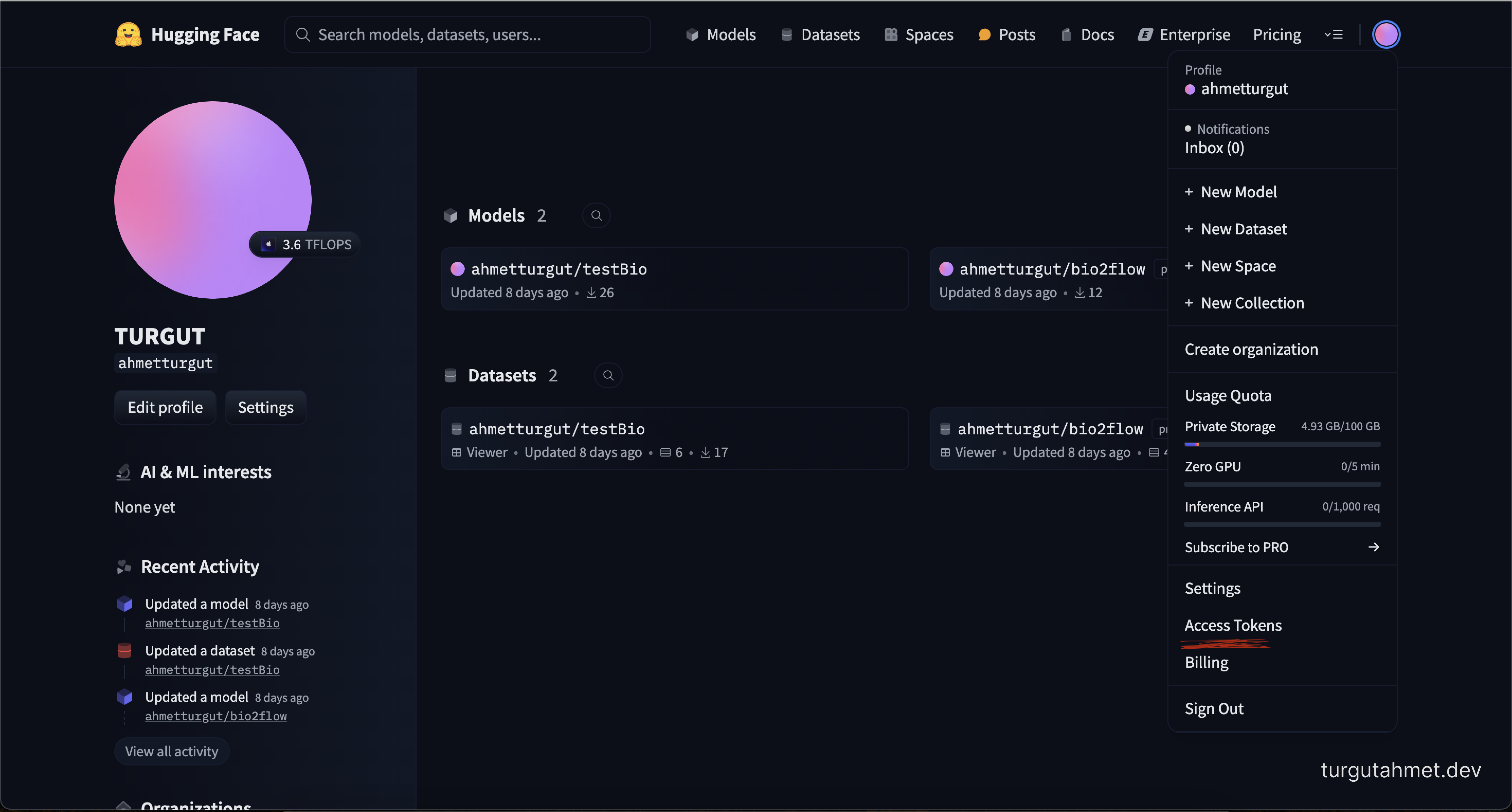
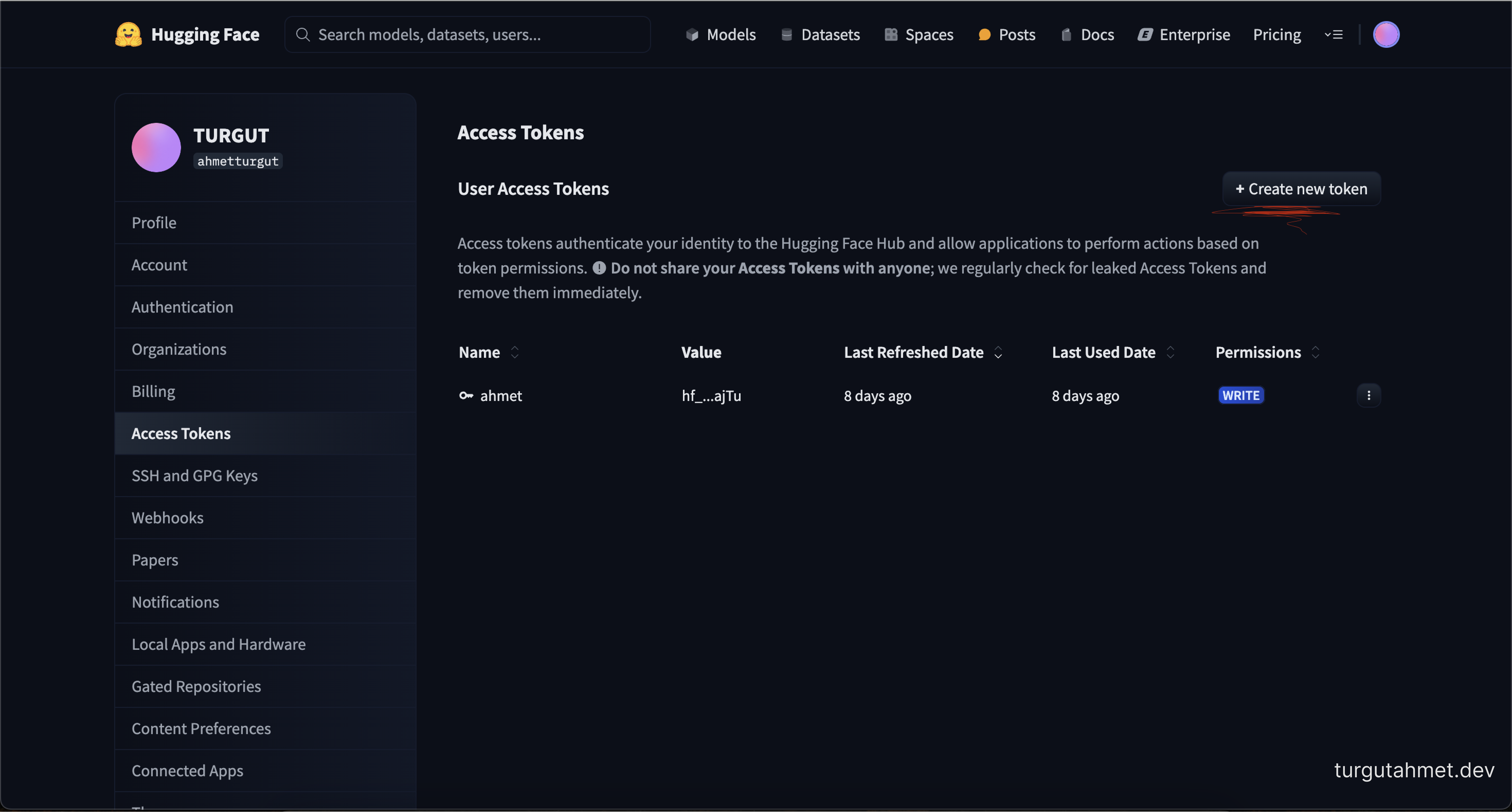
Creating a Hugging Face Token:
To perform fine-tuning using Google Colab, you need a Hugging Face Access Token.
You can create a token on Hugging Face using the link below:
Create a Hugging Face Token
The dataset and model you create on Hugging Face must be shared as Public.
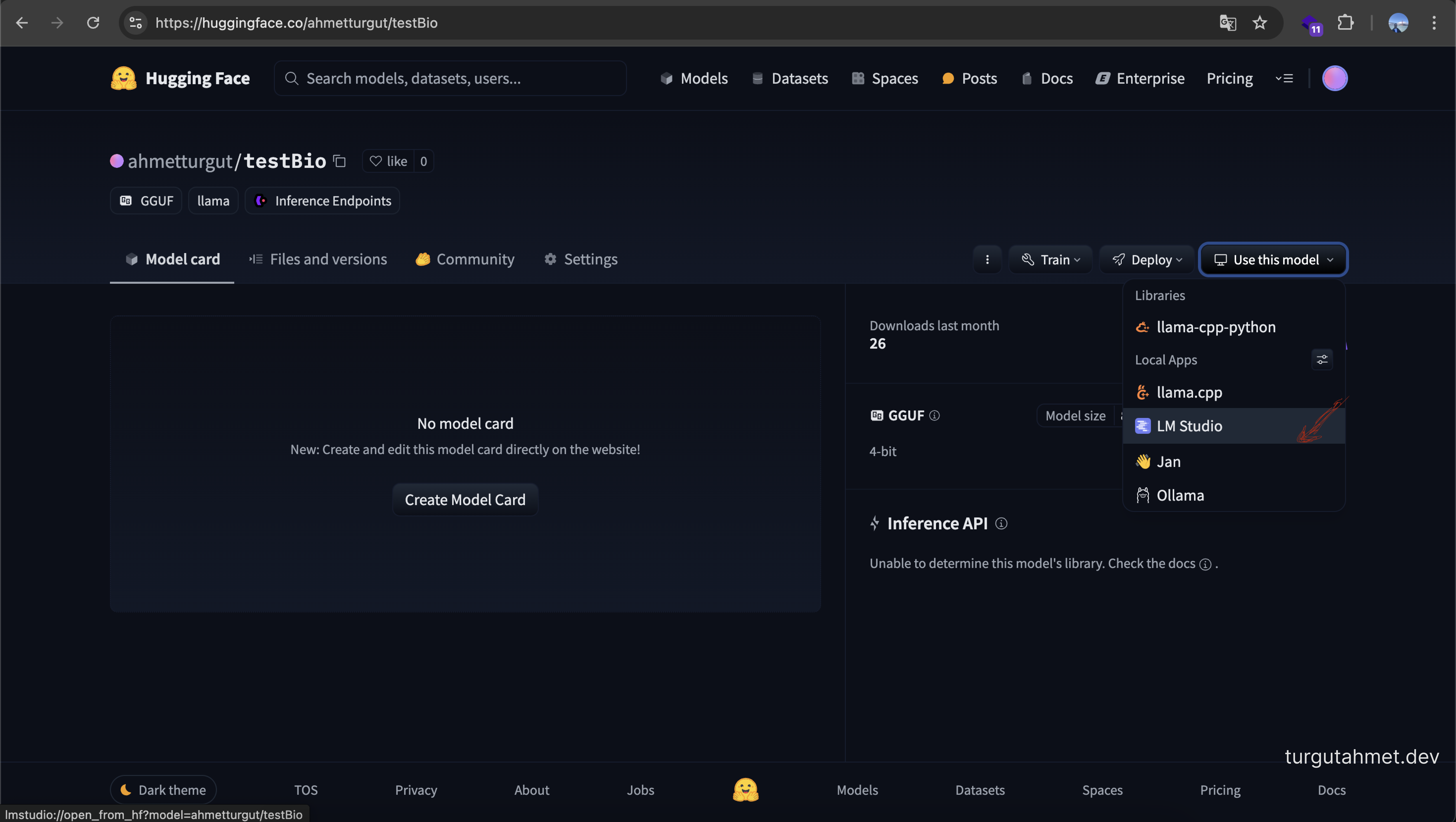
Running a Model Created on Hugging Face Locally:
To run a model created on Hugging Face locally, you can use the link below:
LM Studio
References:
- Xiao, T., & Zhu, J. (2025). Foundations of Large Language Models. arXiv preprint arXiv:2501.09223.
- Vaswani, A., Shazeer, N., Parmar, N., Uszkoreit, J., Jones, L., Gomez, A. N., ... & Polosukhin, I. (2017). Attention is all you need. In Advances in neural information processing systems (pp. 5998-6008).
- Brown, T., Mann, B., Ryder, N., Subbiah, M., Kaplan, J., Dhariwal, P., ... & Amodei, D. (2020). Language Models are Few-Shot Learners. arXiv preprint arXiv:2005.14165.
- Devlin, J., Chang, M. W., Lee, K., & Toutanova, K. (2018). BERT: Pre-training of Deep Bidirectional Transformers for Language Understanding. arXiv preprint arXiv:1810.04805.
- Wolf, T., Debut, L., Sanh, V., Chaumond, J., Delangue, C., Moi, A., ... & Rush, A. M. (2020). Transformers: State-of-the-Art Natural Language Processing. arXiv preprint arXiv:1910.03771.
- Houlsby, N., Giurgiu, A., Jastrzębski, S., & Ghahramani, Z. (2019). Parameter-efficient transfer learning for NLP.
- Hu, E. J., Shen, Y., Wallis, P., Allen-Zhu, Z., Li, Y., Wang, L., Wang, S., & Rajkumar, R. (2021). LoRA: Low-Rank Adaptation of Large Language Models.