Random Access in a Deflate-Compressed XLSX Is Supposed to Be Impossible
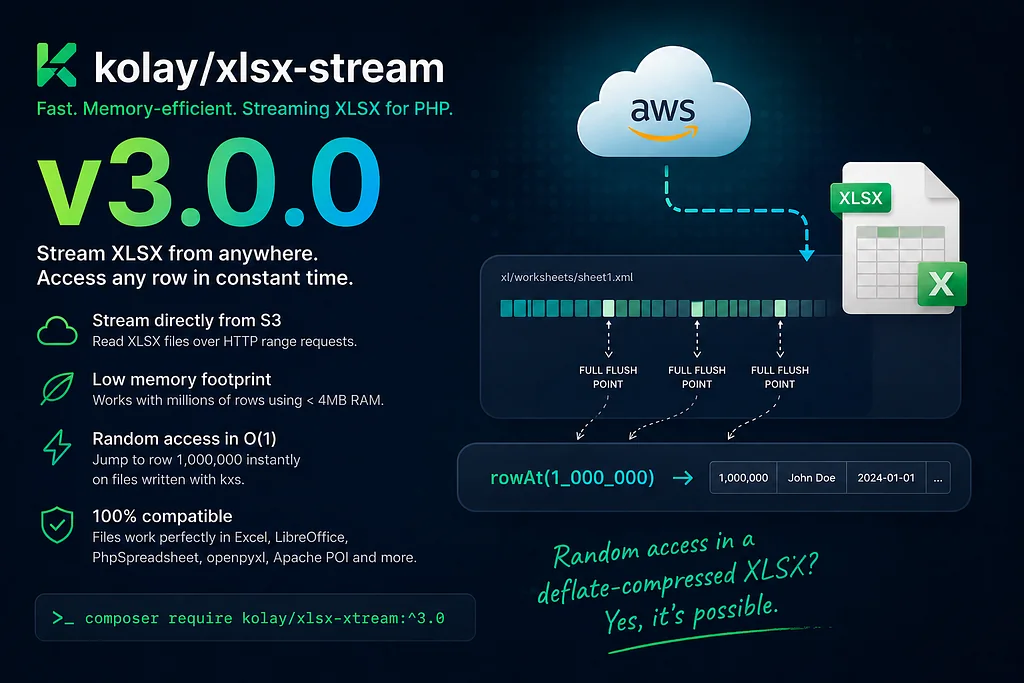
From Orrison’s GitHub issue to v3.0 of kolay/xlsx-stream — seven months, three external reviews, one trick that makes rowAt(1_000_000) work in O(1) on a compressed Excel file.
Seven months ago, Orrison opened issue #2 on kolay/xlsx-stream:
“It would be amazing if it would also be possible to read an XLS/XLSX via a stream from something like AWS S3 or any other stream resource. After some investigation of my own, a solution for that does not currently exist in the ecosystem, resulting in the need to pull the file down to local storage to access.”
My first response was honest and pessimistic. I listed the reasons it couldn’t work — ZIP central directory at the end of the file, shared-strings table that has to live in memory, deflate streams that can’t be entered partway through. I asked him if CSV would do.
I was wrong about almost all of it. v3.0 of kolay/xlsx-stream, released this week, does what Orrison asked for, and then some. It streams XLSX reads directly from S3 in bounded memory. It reads files produced by PhpSpreadsheet, openpyxl, Apache POI, and Excel itself. And — for files written by kxs with an opt-in flag — it does rowAt(1_000_000) in constant time on a compressed sheet.
The last part is the interesting one. Random access in a deflate stream is one of those things that’s “supposed to be impossible” in the same way that running JavaScript in <script> tags was supposed to be impossible before someone read the spec carefully. The spec actually allows it; the standard libraries just don't expose it.
Here’s what changed, in roughly the order it changed.
The Easy Part: A Streaming Reader
The first half of Orrison’s request — streaming reads from S3 — turned out to be straightforward once I stopped trying to use existing parsers.
An XLSX file is a ZIP archive. A ZIP archive stores its central directory at the very end. So the naive sequential-stream approach doesn’t work: you can’t list the contents of a ZIP without seeking to the tail.
S3 lets you do that. GetObject with a Range header reads any byte range you want, and HTTP/1.1 keep-alive lets you do many of them on the same connection. The reader pulls the last ~64 KB of the file (enough to find the end-of-central-directory record even with a max-length ZIP comment), parses the central directory, and now has a map of every entry inside the archive.
class ZipDirectory {
    public function readEntry(Source $source, string $name): string {
        $entry = $this->entry($name);
        $offset = $this->dataOffset($source, $name);
        $compressed = $source->range($offset, $entry['compressed_size']);

        if ($entry['method'] === 0) {
            return $compressed;  // STORED
        }
        return inflate($compressed);  // DEFLATE
    }
}
The Source abstraction makes the rest portable. LocalFileSource does fopen/fseek/fread. S3RangeSource does signed GetObject calls with Range headers. A custom source can implement the same two methods (range, streamFrom) over any byte-addressable storage.
The sheet itself streams. xl/worksheets/sheet1.xml is opened as a deflate stream and pulled in 64 KB chunks. A hand-written tokenizer walks the bytes looking for <row>...</row> boundaries and yields one row at a time. The deflate window is 32 KB. The XML buffer holds at most one in-progress row. Peak RAM stays under 4 MB regardless of how many rows you read.
That much of the package was a few weeks of work and answered Orrison’s original question. The harder problem was the one I hadn’t thought to ask.
The Hard Part: Why “Get Row 1,000,000” Doesn’t Work
XLSX worksheets are deflate-compressed. Deflate is a stateful compressor — the decompressor’s output at byte N depends on every byte from 0 to N-1. You can’t jump in halfway. To read the millionth row of a sheet, you have to inflate everything from the start.
If you only need to read a few rows out of a million, that’s a lot of CPU and bandwidth burned for almost nothing. On a remote file, it’s also a lot of network — even if you only end up using 100 KB of decompressed data, you’ve downloaded the entire compressed sheet to get there.
The standard answer in the PHP ecosystem is “don’t do that” — XLSX readers all scan sequentially. PhpSpreadsheet builds the whole sheet in memory, which makes random access free but also makes the package unsuitable for files larger than a few hundred megabytes. OpenSpout streams sequentially. There’s no random-access XLSX reader in PHP, and I had been assuming there couldn’t be one.
That assumption was wrong, but for a non-obvious reason.
ZLIB_FULL_FLUSH: The Trick Hiding in the zlib Spec
PHP’s deflate_add accepts a flush mode as its third argument. The common ones are ZLIB_NO_FLUSH (the default, which lets the compressor buffer for best ratio) and ZLIB_FINISH (last call, finalize the stream).
There’s a third value almost no one uses: ZLIB_FULL_FLUSH. The zlib spec says it "outputs all the data and resets the compression state to allow decompression to restart from this point."
That last clause is what makes random access possible. If the writer emits a ZLIB_FULL_FLUSH marker at known points in the stream — say, every 10,000 rows — then a decompressor can be initialized fresh, given the bytes starting from one of those markers, and successfully resume decompression from that point. No reading from the beginning. No state inheritance. The full-flush marker is an entry point.
Excel doesn’t know or care about these markers. They look like normal deflate output. Every XLSX reader in existence still reads the file correctly. The markers are invisible.
The writer just needs to remember where they are.
xl/_kxs/index.bin: A Sidecar No One Sees
When the writer is invoked with withRandomAccessIndex(every: 10000), two things happen.
First, the row buffer is flushed with ZLIB_FULL_FLUSH instead of ZLIB_NO_FLUSH every 10,000 rows. The byte offset (in the compressed stream), the byte offset (in the uncompressed stream), and the row number get appended to an in-memory list of sync points.
Second, at finishFile() time, that list is serialized into a small binary format and written as an extra entry inside the ZIP archive at xl/_kxs/index.bin. The format has a magic header, a version, a CRC32 of the body, a sync period, and an array of sheet sections each containing the sheet's path, total row count, sheet content CRC32, and the list of sync points.
The size is negligible — a million-row workbook with every: 10_000 produces about 100 sync points per sheet, ~24 bytes each, plus headers. The whole sidecar is well under 4 KB for any reasonable file.
On the reader side, rowAt(N) works like this: load the sidecar, find the largest sync point with row <= N, seek to its compressed offset, initialize a fresh inflate context from those bytes, and skip forward to row N. Worst case, you skip N % syncPeriod rows after the seek — bounded by the period, independent of file size. With every: 10_000, every lookup is at most 10,000 rows of skip.
$reader->rowAt(1_000_000);   // O(1) seek + ≤10K-row skip
$reader->rowRange(500_000, 500_100);  // O(1) seek + 100-row stream
$reader->rowCount();   // O(1) — read directly from sidecar header
The two rowAt(1_000_000) calls back-to-back share no state but still each only inflate the relevant region. On a 4.5M-row workbook, a rowAt(4_000_000) call on a remote S3 file finishes in well under a second.
The Bug That Almost Shipped: Excel Repair Mode
The first version of this design did exactly what I just described. The sidecar was added to the ZIP, the reader used it for random access, and the writer/reader round-tripped cleanly.
Then I opened one of the test files in Excel for Mac. A dialog popped up: “Excel found unreadable content in the workbook. Do you want to recover the contents?”
The “Recovered” version was identical to the original, but the dialog was a deal-breaker. No user is going to install a package that produces files Excel calls broken.
The cause was buried in OOXML, specifically in [Content_Types].xml — the manifest at the root of every XLSX file that maps part names to MIME types. The ECMA-376 standard has two relevant sections:
- §10.1.2.2 says every part in the package must have an associated content type, either through an Extension default rule or an explicit Override.
- §10.1.4 says relationship parts (*.rels files) are exempt from this requirement — they have a hardcoded content type that doesn't need to appear in the manifest.
The sidecar xl/_kxs/index.bin is neither a relationship part nor covered by any default extension rule. Without an explicit Override, Excel's strict OOXML validator flagged it as a violation of §10.1.2.2 and went into repair mode.
The fix was a single Override entry in [Content_Types].xml:
<Override PartName="/xl/_kxs/index.bin"
          ContentType="application/octet-stream"/>
application/octet-stream tells Excel "this part is opaque binary; don't try to parse it." Excel honors the declaration, leaves the sidecar alone, and opens the file clean.
This is a one-line fix. Finding it took two days. Spec reading is real work.
The Stale-Index Problem: When Excel Touches the File
The next bug came from imagining a perfectly normal user workflow.
You write an XLSX with withRandomAccessIndex(). The file lands on disk. Someone opens it in Excel. They make a change — fix a typo in row 47 — and hit Save.
Excel rewrites the sheet from scratch. The compressed bytes of xl/worksheets/sheet1.xml are completely different now. Every sync point in your sidecar still points to the old byte offsets, which no longer correspond to anything meaningful. The sidecar didn't get updated because Excel doesn't know it exists.
If the reader naively trusts the sidecar after this, every rowAt() call seeks to a garbage offset and either inflates noise, fails with a corrupt-stream error, or — worst case — succeeds at inflating nonsense.
The defense is straightforward in hindsight. The sidecar’s sheet_crc32 field records the CRC32 of the sheet content at write time. The ZIP central directory's per-entry CRC32 records the CRC32 of the sheet content at read time. If Excel rewrote the sheet, the two CRCs disagree.
When they disagree, the reader silently falls back to a non-indexed sequential scan. No exception, no warning, just degraded performance — Mode B becomes Mode A. The user gets correct results either way; only the speed differs.
$expectedCrc = $index->sheetCrc32($sheetEntry);
$actualCrc = $this->cd->entry($sheetEntry)['crc32'];

if ($expectedCrc !== null && $expectedCrc !== $actualCrc) {
    return $this->randomAccessIndex = null;  // silent fallback
}
This pattern — “validate the sidecar against the ZIP central directory and fall back on mismatch” — turned out to be the right framing for a lot of related concerns. Three external reviewers walked the package before RC, and each one found bugs that fit the same shape.
Three External Reviews Caught Real Bugs
Once the core algorithm worked, I sent the branch to three external reviewers in sequence. Each one found things I hadn’t.
The first reviewer found that StreamingSheetReader always called inflate_init regardless of the entry's compression method. ZipDirectory::readEntry already handled STORED (method 0) and DEFLATE (method 8) correctly for metadata files. The sheet reader didn't. Some editors emit STORED worksheets — the file would parse cleanly with one reader and fail with the other. One method check fixed it.
The same reviewer noticed that the shared-strings RAM guard checked compressed_size but the parser ran on uncompressed_size. Highly repetitive XML compresses at 50:1 or higher. A 20 MB compressed sharedStrings.xml could inflate to a gigabyte. The guard caught the wrong number. Adding a separate uncompressed_size check — and a post-inflate strlen() check as defense-in-depth against forged ZIP metadata — closed the gap.
The second reviewer did a wider audit. The biggest find: RandomAccessIndex::decode() validated the format (magic, version, CRC) but not the semantics. A CRC-valid sidecar could still contain non-monotonic row numbers, sync offsets that overshoot the actual compressed entry, duplicate sheet entries, or trailing garbage bytes. A maliciously crafted sidecar would pass CRC validation and then drive the inflater into adjacent ZIP bytes.
The fix was a layer of semantic validation in decode() (monotonic rows and offsets, sane sheet counts, no trailing data) plus a CD-aware bounds check in the reader (every sync point's comp_offset must be inside the actual compressed entry size). Any failure invalidates the entire sidecar and falls back silently.
The third reviewer found something even simpler but no less important. CellTokenizer::columnLettersToIndex had no upper bound. Excel's max column is XFD (16,383 zero-indexed), but a crafted cell reference like r="ZZZZZZ1" resolves to column index 12 million. The tokenizer would dutifully allocate a dense row array with that many slots, exhausting memory on a single malformed cell. One bounds check at the column-letter parser closed the DoS surface.
Across the three reviews, twelve real bugs got caught and fixed before RC. None of them were the kind of thing my own tests had been written to look for. The reviewers asked questions I hadn’t thought to ask.
What v3.0 Looks Like on a Benchmark
100,000 rows, write + read, latest stable May 2026 versions of every actively maintained PHP XLSX package, fresh PHP process per package, identical 8-column payload:
Package Version Write Read Peak RAM (read) kolay/xlsx-stream (tuned) 3.0.0 0.65 s 1.75 s 4 MB kolay/xlsx-stream (default) 3.0.0 1.26 s 2.28 s 4 MB avadim/fast-excel-* 6.12 / 3.0.1 5.23 s 4.60 s 2–4 MB openspout/openspout 5.7.0 5.77 s 9.90 s 2 MB rap2hpoutre/fast-excel 5.7.0 7.30 s 8.50 s 4 MB phpoffice/phpspreadsheet 5.7.0 30.62 s 29.95 s 434/531 MB
The tuned column uses setCompressionLevel(1) and setBufferFlushInterval(10000). Both are existing public APIs in v2.x — nothing new. They trade ~5% file size for substantial throughput.
At the tuned config: 8× faster write and 2.6× faster read than the nearest streaming peer (avadim). At kxs’s own default config (level 6, flush 1000), the gap is still ~5× write and ~2.4× read.
PhpSpreadsheet sits in a different category. It gives you charts, pivot tables, conditional formatting, formulas, and a full Excel cell graph — at the cost of a memory-bound architecture. For the workloads where the streaming packages compete, it’s 5–47× slower. For workloads where you actually need pivot tables, none of the streaming packages can help you. They’re not the same product.
The relevant gap, then, is the gap with the other streaming packages. That’s where v3.0’s combination of bidirectional streaming, S3 Range-GET reads, and born-indexed random access doesn’t have an equivalent.
A Note on “Different Category”
Every benchmark that shows your package faster than PhpSpreadsheet by 47× should come with a disclaimer, and I want to be direct about mine.
PhpSpreadsheet is fundamentally a different product. It maintains a full in-memory representation of the workbook so you can do things kxs cannot: add a chart, run a formula, apply conditional formatting that depends on values in other cells. If you need those things, you’re going to use PhpSpreadsheet (or pay for an Excel automation server), and the comparison stops being useful.
The reason the table includes PhpSpreadsheet at all is that, in practice, people do reach for PhpSpreadsheet for workloads where they don’t need any of its differentiating features. They need to write a million rows from a database query to an XLSX file, and they pick the package they’ve heard of. That’s where the 26× write speedup and the 108× RAM reduction matter — for the workload PhpSpreadsheet is wrong for but commonly used on.
For the workloads PhpSpreadsheet is right for, no streaming package is an alternative.
What I Took Away
Most “impossible” features are actually “not made easy.” Random access into a deflate stream isn’t a hack — it’s a clearly specified feature of the zlib format that PHP’s standard deflate_add exposes via a single flush-mode argument. The reason no one was using it for XLSX wasn't technical impossibility. It was that no one had connected the spec line to the use case. Reading manuals carefully pays off.
External review remains the highest-leverage thing you can do. I went through three reviewers in sequence, and each one found bugs the previous reviewers missed. Not because the previous reviewers were lazy — because each reviewer has their own framework of “what would I check?” and the gaps in those frameworks don’t overlap. The STORED worksheet bug had been in the code since I wrote the reader. I had read it many times. The compressed-vs-uncompressed RAM guard had been there since the first sharedStrings guard. The third reviewer caught the documentation lie about default sync period that the first two had missed. Different angles, different blind spots.
A major version is the right time to absorb breadth. kolay/xlsx-stream v2.x was a writer. v3.0 is a bidirectional pipeline. That’s a major version regardless of API compatibility, and once you’re paying the version-bump cost, the marginal cost of including the column cast API, the date1904 auto-detection, the PhpStreamSink, and the ZIP32 guards is small. Users who upgrade once cope much better than users who upgrade five times in three weeks. Major versions are rare; don't waste them on a single feature.
Defense-in-depth is cheaper than it looks. The sst guard has three layers (compressed size, uncompressed size, post-inflate strlen). The sidecar has four (CRC of the body, semantic validation of contents, CD-aware bounds check, sheet-content CRC for stale detection). Each layer is a few lines of code. None of them affect the happy path. All of them turn what would be silent corruption into a clear error or a graceful fallback. The expensive thing is figuring out which layers to add; the layers themselves are cheap.
Backward compatibility is a contract, not a courtesy. Files written by v3.0 without withRandomAccessIndex() are byte-identical to files written by v2.2.2. This wasn't an accident. The hot path of the writer didn't change. Existing users get zero migration cost, and existing files written with v2.x remain readable. v3.0 is a strict superset of v2.x — anything that worked before still works the same way, with the same bytes, in the same time.
Try It
composer require kolay/xlsx-stream:^3.0
The minimal reader:
use Kolay\XlsxStream\Readers\StreamingXlsxReader;

$reader = StreamingXlsxReader::fromS3($s3, 'bucket', 'big.xlsx');

foreach ($reader->rows(skip: 1) as $row) {
    // process one row at a time, bounded RAM
}
With random access:
$writer = SinkableXlsxWriter::forDisk('s3', 'reports/users.xlsx');
$writer->withRandomAccessIndex(every: 10000);
$writer->startFile(['ID', 'Name', 'Email', 'Created']);
$writer->writeRows(User::query()->lazy(1000)->map(fn ($u) => [...]));
$writer->finishFile();

// later, on any reader that pulls from the same path:
$reader = StreamingXlsxReader::fromFile('users.xlsx');
$reader->rowAt(500_000);           // O(1)
$reader->rowRange(1_000, 1_100);   // O(1) seek + 100 rows
$reader->rowCount();               // O(1)
Reads files from PhpSpreadsheet, openpyxl, Apache POI, and Excel. Writes files Excel opens cleanly (verified in Excel for Mac 16.98 and Numbers 14.2). PHP 8.1+, Laravel 10/11/12/13.
- GitHub: github.com/turgutahmet/kolay-xlsx-stream
- Packagist: kolay/xlsx-stream
- Release notes: v3.0.0
- Benchmark methodology: BENCHMARK.md
The acknowledgements section of the release notes credits Orrison’s original issue and the three external reviewers. None of them got paid for any of this. The package is better because of all of them. If you’ve found yourself in a similar place — wanting to do something the ecosystem says is impossible — open the issue anyway. Sometimes “impossible” just means “no one has gotten around to it.”